
Live from Israel, on the screens in your home
Israeli TV Without a Cable Box, Live and on Demand
Watch Israeli TV live anywhere in Israel: Kan 11, Channels 12, 13 and 14, i24NEWS, sports and Hebrew series on demand, on a Smart TV, stick, phone or laptop, with no box to rent. Plans from ₪35 a month, with no automatic renewal.
- No automatic renewal
- 1 to 5 screens
- Prices in Israeli shekels
Israel time, and the next main news
3 hoursto the news
At 5:00 pm in Israel, the main evening news on Kan 11, Channel 12 and Channel 13 is three hours away.
- No automatic renewalPay once for 1, 3, 6 or 12 months
- 1 to 5 screensMulti-screen plans for the whole house
- Four ways to payCard, PayPal, crypto or gift card
- First-week refund ruleIf it will not play and support finds no fix
Channels
Israeli Channels Streaming Live
Every channel on the list plays at the same moment it airs in Israel, so the evening news, the talk shows and the season finales reach you live instead of a day later. It is Israel TV live, carried over the internet rather than by a dish.
News and current affairs
Kan 11 from the public broadcaster, Channel 12 with N12 News, Channel 13 and Channel 14, plus i24NEWS, which runs a full channel in English.
Prime time and entertainment
The drama, satire and reality shows of Keshet 12 and Reshet 13, and the series and documentaries that Kan 11 produces.
Kids and family
Kan Educational and Hebrew programs for children, a simple way to keep the language going at home.
Lineups change from time to time. If one channel matters most to you, ask on WhatsApp before you order. israeliptv.vip has no tie to any of these broadcasters. What each channel shows, and who runs it, is in the channels guide.
Streaming live from Israel
- Kan 11Public broadcaster: news, drama, documentariesHebrew
- Channel 12 (Keshet 12)N12 News and prime-time entertainmentHebrew
- Channel 13 (Reshet 13)News, series and reality showsHebrew
- Channel 14News and talk showsHebrew
- i24NEWS24-hour news channelEnglish
- Kan EducationalPrograms for children and familiesHebrew
Live News in Hebrew and English
i24NEWS broadcasts a 24-hour English channel from Israel: headlines, interviews and debate programs, all presented in English. It is the channel to put on when not everyone at home reads Hebrew. Kan, the public broadcaster, also posts news in English on its website.
The main newscasts on Channel 12, Channel 13 and Kan 11 are in Hebrew, without English subtitles, and start at 8 pm. On channels that offer catch-up, you can start them from the beginning later in the evening.
Israeli Sports: Soccer, Basketball and Match Days
Israeli Premier League (Ligat Ha'Al) soccer and the Israeli basketball league are shown on Israeli sports channels in the lineup. Most league games kick off in the evening, and Saturday games start once Shabbat is out, so the big sports nights are the ones when the whole family is home.
Whether a given game is shown depends on each channel's broadcast rights.
Hebrew Series, Movies and Kids Shows on Demand
Next to the live channels, every plan comes with an on-demand library: Israeli TV series and Israeli movies in Hebrew, shows for children and international films. Its size depends on the plan.
- Home24,000+ series100,000+ movies
- Family61,000+ series155,000+ movies
- Complete 4K47,000+ series179,000+ movies
A look at the international on-demand shelf
Examples of what plays next to the Israeli channels. Titles rotate, and the size of the shelf depends on the plan.

Stranger Things 5 
Wake Up Dead Man 
Champions League 
Jay Kelly 
The Abandons 
Formula 1 
Man vs Baby 
My Secret Santa 
UFC 
Revenge 
Roshn Saudi League
Schedule
Broadcast Times, Catch-Up and Internet Speed
The Israeli TV day has a fixed shape: morning shows, an early evening update, the 8 pm news, then prime time and the late shows. The table gives the usual slots in Israel time, and the clocks at the top of the page count down to the next main edition.
| Israel time | What airs | Where |
|---|---|---|
| 7:00 am | Morning shows | Channel 12, Channel 13, Kan 11 |
| 8:00 pm | Main evening news | Kan 11, Channel 12, Channel 13, Channel 14 |
| 9:00 pm | Prime time | Drama, satire, reality shows, evening soccer |
| 11:00 pm | Late night | Talk shows after prime time |
Times follow the wall clock in Israel, in winter time (IST) and summer time (IDT) alike.


Winter time and summer time
Israel runs on Israel Standard Time (IST, UTC+2) in winter and Israel Daylight Time (IDT, UTC+3) from late March to late October. The schedule follows the wall clock, so the main news stays at 8 pm all year. The clocks on this page switch between the two by themselves.
Catch-up
On channels that offer catch-up, you can start a program after it aired: the 8 pm news once the kids are in bed, or Friday's magazine on Saturday night.
Internet speed
Each screen watching in HD needs roughly 10 megabits per second of steady internet; a 4K stream on the Complete 4K plan wants about 25. On match days, a network cable to the TV or the stick holds up better than Wi-Fi.
Israeli Channels by Dish, by Cable or Over the Internet
The usual ways to get Israeli channels at home are a satellite package and a cable or fiber TV package with the provider's box. Here is what changes when the same channels arrive as a login on a device you already have. The first two columns describe the usual setup, not any one company.
| What to compare | Satellite package | Cable or fiber TV box | Plan from israeliptv.vip |
|---|---|---|---|
| What goes in the house | A dish outside and a receiver next to the TV | The provider's box, usually one for each TV | Nothing new: a player app on the TV, stick, phone or computer you own |
| Getting started | An installer, a clear view of the sky and permission to mount the dish | A technician visit or a box by courier, then a contract on your name | You type a login into the app, with the steps we send for your device |
| How you pay | Equipment up front, then a monthly fee | A monthly bill, usually on top of a base TV package | Once, for 1, 3, 6 or 12 months, and nothing renews by itself |
| Another room | Another receiver | Usually another box and another fee | A multi-screen plan: 2 to 5 screens at once |
| Moving house | Taking the dish down and mounting it again | A transfer, if the provider serves the new address | Nothing to move: sign in again at the new address |
| What can interrupt it | Heavy rain or snow can cut the signal | A channel can move to a pricier tier | A slow or crowded internet line lowers the picture |
Lineups change over time on every route, ours included. The internet speeds that keep the picture steady are listed above, under Internet speed.
Plans and prices
Israeli TV Plans for Households in Israel
Three plans, each with the Israeli channels above. They differ in the size of the worldwide catalog and in 4K. On each plan's page you pick 1, 3, 6 or 12 months and pay once for the whole period, in Israeli shekels; nothing renews by itself. One month costs ₪35 on Home, ₪49 on Family and ₪89 on Complete 4K.
How ordering works
- Send your order with the form, nothing to pay yet.
- You get a trial line first and see the server running on your own device.
- Once you have seen the server, you confirm the payment and the full plan is switched on.
TV, streaming stick or phone
Home, 1 screen
The Israeli lineup at the lowest price
from ₪35
From 1 month to 12 months
- 20,000+ channels
- 24,000+ series
- 100,000+ movies
- 1 screen at a time
TV, streaming stick or phone
Family, 1 screen
The largest series library
from ₪49
From 1 month to 12 months
- 27,000+ channels
- 61,000+ series
- 155,000+ movies
- 1 screen at a time
TV, streaming stick or phone
Complete 4K, 1 screen
Most channels and movies, with 4K
from ₪89
From 1 month to 12 months
- 57,000+ channels
- 47,000+ series
- 179,000+ movies
- 4K on titles offered in 4K
- 1 screen at a time
Over 12 months, the Home plan works out to ₪13 a month, billed ₪159 once. Family comes to ₪21 a month (billed ₪249 once) and Complete 4K to ₪26 a month (billed ₪309 once).
Several Screens for the Family, 12 Months
Up to 5 screens at the same time, on a 12-month plan
The same plans on 2, 3, 4 or 5 screens at once: the living room TV, a tablet in the kitchen, a phone on the train. One price covers all the screens for 12 months.
Several devices at once: TV, computer, tablet, phone
Home multi-screen, 12 months
The Israeli lineup at the lowest price
from ₪239
From 2 screens to 5 screens
- 20,000+ channels
- 24,000+ series
- 100,000+ movies
- 2 to 5 simultaneous connections depending on the option
Several devices at once: TV, computer, tablet, phone
Family multi-screen, 12 months
The largest series library
from ₪349
From 2 screens to 5 screens
- 27,000+ channels
- 61,000+ series
- 155,000+ movies
- 2 to 5 simultaneous connections depending on the option
Several devices at once: TV, computer, tablet, phone
Complete 4K multi-screen, 12 months
Most channels and movies, with 4K
from ₪419
From 2 screens to 5 screens
- 57,000+ channels
- 47,000+ series
- 179,000+ movies
- 4K on titles offered in 4K
- 2 to 5 simultaneous connections depending on the option
All prices
Prices in Israeli shekels (ILS), total for the period. Each price opens its plan.
Which Plan Fits the Way You Watch
All three plans carry the same Israeli live channels. They differ in the size of the on-demand catalog and in 4K, and each one also comes with extra screens that play at the same time. Four common cases, and the page to open for each:
Mostly the news and a weekend game
Live TV is identical on every plan, so the lowest price does the job: the Home plan, from ₪35 a month.
A Hebrew series most evenings
Family has the biggest series shelf of the three, 61,000+ titles: see Family on one screen.
A 4K television and a fast line
Titles offered in 4K play at full resolution on a 4K set with about 25 megabits per second to spare: Complete 4K for a single TV.
Two or more screens at the same time
Every plan is also sold for 2 to 5 screens over 12 months: Home on several screens, Family for the whole household or Complete 4K in several rooms.
Every length and screen count sits in the table of all 24 prices.
Before You Pay: Refunds, Card Details and Renewals
When you are refunded
If the service does not work within 7 days of activation and support cannot fix it, you are refunded. Write on WhatsApp with your order number, your device and what you see on screen, and support tries a fix first. The refund policy has the full wording.
What the order form never asks
It asks for your name, email, phone number, country and device, and the way you want to pay. It never asks for a card number, a PayPal password or a crypto wallet key: the payment link or details for your method come after the order, so the form itself charges nothing.
Nothing renews
Each payment covers the period you chose and ends with it. No renewal charge can arrive later; to keep watching, you place a new order, on the same plan or another one.
Terms of saleRefund policyPrivacy policyCookie policyContact
How to Pay and Where to Get Help
Pay by card (Visa, Mastercard, American Express, Discover), PayPal, crypto (Bitcoin, USDT) or gift card. The same four ways to pay work for every plan, every length and every number of screens.
- Visa, Mastercard, American Express, Discover
- PayPal
- Crypto: Bitcoin, USDT
- Gift card

Choose a plan and an option
Open the plan's page, pick a length or a number of screens and press Choose plan. The order form opens with that option already ticked.
Send the form, then pay by card, PayPal, crypto or gift card
Leave your name, email and WhatsApp number and pick a payment method. WhatsApp opens with your order number, the payment details follow, and you pay once for the period. Nothing is charged again when it ends.
Enter your login in a player app
After payment you receive your login. Enter it in the player app on your TV or stick and the Israeli channels appear. Stuck on a step? Write in the same chat.
Devices
Smart TVs, Streaming Sticks, Phones and Computers
There is no single Israeli TV app to install. Your plan comes as a login, and you open it in a player app on the device you watch on.








Amazon Fire TV Stick
Plugs into any TV with an HDMI port. Install a player app, then enter your login.
Samsung and LG Smart TVs
Samsung (Tizen) and LG (webOS) sets take compatible players from their own app stores.
Android TV and Google TV
Sony, TCL and Hisense TVs running Google TV, the Google TV Streamer and Android boxes.
Apple TV, iPhone and iPad
Player apps from the App Store handle the login on tvOS and iOS.
Android phones and tablets
Watch on Wi-Fi at home or on mobile data when you are out.
Windows and Mac
A desktop player app on Windows or macOS does the job.
Player apps such as IPTV Smarters Pro and TiviMate work with the service. They are third-party apps: we don't publish them, and they don't supply any channels. Tell us your device and we point you to one that fits. If you watch on Roku, ask us before you order (see the FAQ). Step by step for each device: the apps and devices guide.
Guides
Two Longer Reads Before You Choose
One guide goes channel by channel, the other device by device. Both end on the plan pages, so you can read first and order after.

Guide
Israeli TV channels explained
Who runs each channel, what it is known for, and when its main news and prime time go on air.
Read the guide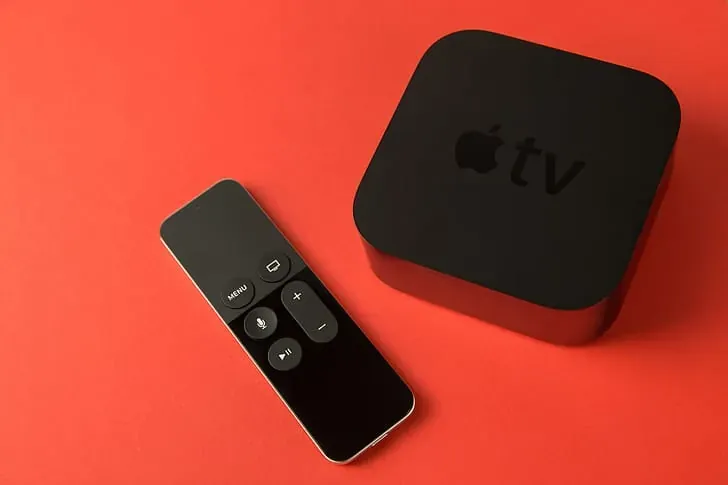
Guide
Israeli TV app and devices
What to install on a Fire TV Stick, a Samsung or LG set, Android TV, Apple TV, a phone or a computer, and the honest answer on Roku.
Read the guideGuide
Israeli TV, the complete guide
The whole map in one place: channels, news, series, sports, children, the holiday calendar and the practical way to watch without a cable box.
Read the guideGuide
Israeli news live
The 8 pm editions, the Friday magazines and the English channels, with a table of every slot and the steps to watch live.
Read the guide
Guide
Israeli TV series
Thrillers, family dramas, comedy and the originals behind Homeland and In Treatment, sorted by genre with where to watch each one.
Read the guideQuestions
Israeli TV Streaming FAQ
How can I watch Israeli TV without a cable box?
Through a streaming service that carries Israeli channels over the internet. You choose a plan, receive a login and open it in a player app on your Smart TV, Fire TV Stick, phone or computer. The channels then play live, with no dish, no cable box and no technician visit.
Can I watch Israeli channels for free?
Partly. Kan posts news and some programs on its website, and i24NEWS streams English news on YouTube. Free sources cover news and clips rather than the full lineup. A plan brings the channels, sports and on-demand library to your TV.
What is the most popular TV channel in Israel?
Channel 12 (Keshet 12) has been Israel's most watched channel for years, led by its 8 pm news. Channel 13, Channel 14 and Kan 11, the public broadcaster, compete for the next places, and their order changes with the time slot and the season.
Can I watch Channel 12 and Channel 13 live on a phone or laptop?
Yes. Both play live, at the same moment as the broadcast, on a phone, laptop, Smart TV or stick. The main evening news starts at 8 pm, and on channels that offer catch-up you can also start it later the same evening.
Is there an Israeli news channel in English?
Yes. i24NEWS broadcasts a 24-hour English channel from Israel, and it is in the lineup we list; ask on WhatsApp to confirm a channel before you order. Kan also publishes English news on its website. Live news on Channel 12, Channel 13 and Kan 11 is in Hebrew, without English subtitles.
How much does it cost to watch Israeli channels online?
The Home plan costs ₪35 for one month or ₪159 for 12 months. Family is ₪49 for one month or ₪249 for 12 months, and Complete 4K is ₪89 or ₪309. Plans for 2 to 5 screens start at ₪239 for 12 months. No plan renews automatically.
Which app do I use to watch?
Any player app that accepts an M3U playlist or a username and password login. On Fire TV and Android TV, IPTV Smarters Pro and TiviMate are common choices, and Samsung, LG and Apple TV have compatible players too. These are third-party apps, not ours. We send the setup steps for your device.
Does it work on Roku?
Roku has no player app we recommend, so if Roku is your only device, ask us on WhatsApp before you order. On a Roku TV, the usual way around it is a second streaming device, such as an Android-based stick, in a free HDMI port: you switch with the input button, and the Roku menu stays as it is.
What are the main Israeli news channels?
Kan 11 carries Kan News from the public broadcaster. Channel 12 airs N12 News, and Channel 13 and Channel 14 run their own news divisions. For news in English, i24NEWS runs a 24-hour channel. Most Hebrew channels air their main newscast at 8 pm Israel time.
Is there a contract, and how do I pay?
There is no contract and no automatic renewal. You pay up front for 1, 3, 6 or 12 months by card, PayPal, crypto (Bitcoin or USDT) or gift card. If the service doesn't work within 7 days of activation and support can't fix it, you get a refund.
Start with One Month or a Full Year
A month of the Home plan costs ₪35 and a full year costs ₪159. Choose one of the plans above and open the order form, or write to us on WhatsApp: we confirm the plan, then help you get the Israeli channels running on your device.
israeliptv.vip works on its own: none of the channels, leagues or apps named on this site runs it, sponsors it or endorses it.